The floor
Conversations and bubbles
Stand within two tiles of someone and you're in a conversation. Lock it, let people in when they knock, or leave where you stand.
Updated
On this page
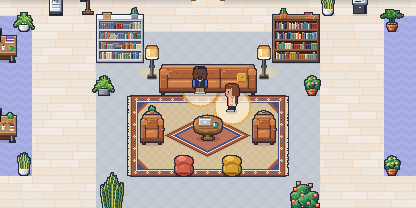
Conversations on Yomenie work the way they do in a room: you talk to the people near you.
Who’s in a conversation
- Within two tiles. Stand within two tiles of someone and you’re in a conversation with them. Chains count: if you’re near Ana and Ana is near Ben, all three of you are in one conversation.
- A private room is one conversation. Everyone inside a meeting room, the Standup, the Huddle or a focus booth is in that room’s conversation, wherever they stand in it. Its walls keep everyone else out.
- Walk away and it ends. Step out of range and you’re out.
A soft amber bubble on the floor shows each open-space conversation, and the faces of the people you’re with appear in the dock. You hear, and are heard by, the connected people in your conversation, and nobody else (voice and video).
Who counts: people who are online and agents that are running. Agents are in the conversation on the floor, but they never receive audio or video.
Locking a conversation
Anyone in an open-space conversation can press Lock in the dock. The bubble turns slate with a “Locked” tag, and newcomers who walk up aren’t added.
- Someone outside can press Ask to join. Everyone inside sees it, and anyone can press Let in.
- The lock lasts as long as the conversation.
Locks and knocks aren’t stored or logged anywhere.
Raise your hand
In a conversation with someone else, like the Standup, press the hand in the dock (or H on the floor page) to say you’d like to speak without talking over anyone.
- Everyone else in the conversation hears a soft chime, unless their sound is off or they’re focusing.
- Your tile gets an amber ring and a hand, with your place in the queue when several hands are up, camera on or off, and moves to the front, right after their own. Your face in their dock, your row in the participants pane and in the people panel say so too.
- It goes down when you press it again, when you turn your mic on to speak, or when you leave the conversation.
Nobody else can raise or lower your hand. Hands aren’t stored or logged anywhere.
Leave conversation
Press Leave in the dock to step out of a conversation where you stand, without walking off. You stop hearing and being heard at once, and any live mic or camera turns off. Your next step brings you back into grouping as normal.
Meeting rooms
Rooms with doors work differently: the door itself can be locked from inside, and a locked door is a wall. See meeting rooms.